
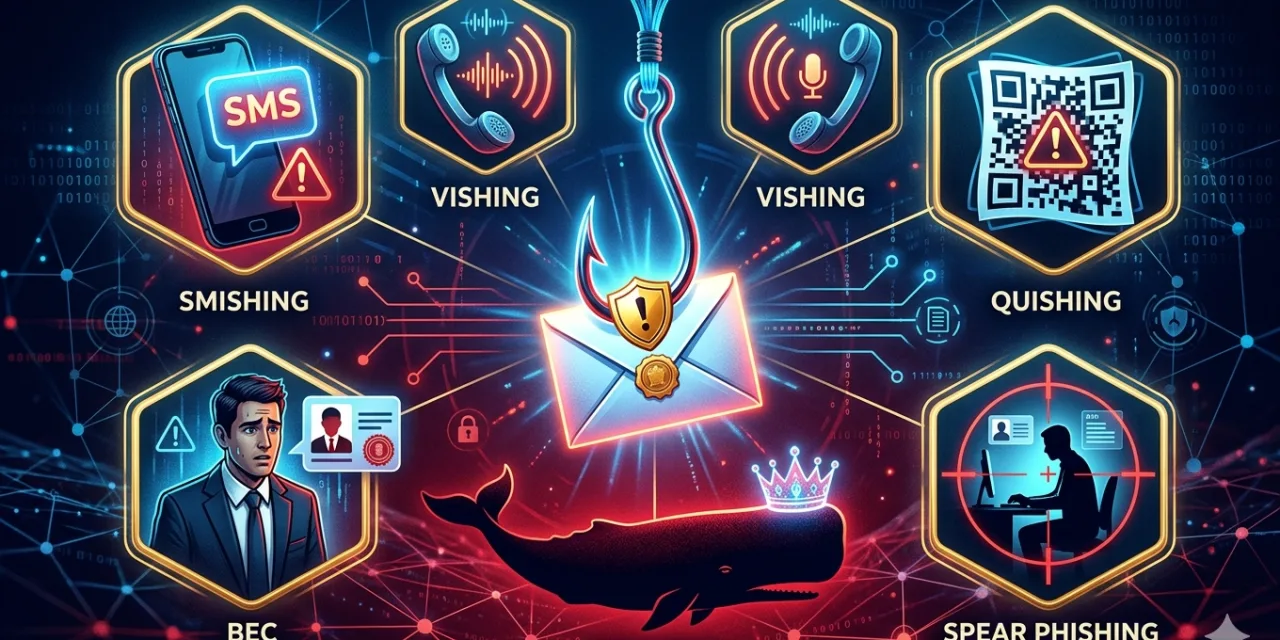
Phishing is the primary entry point for over 90 percent of successful cyberattacks. It is the most reported cybercrime category in the FBI’s Internet Crime Complaint Center for the second consecutive year. It costs businesses $25 billion globally per year. Business Email Compromise — the most financially devastating form of phishing — caused $2.77 billion in losses in the US alone in 2024, with over $55 billion lost globally to BEC attacks between 2013 and 2023. In 2026, with AI-generated phishing emails achieving click-through rates of 54 percent — matching the performance of emails crafted by expert human attackers — the threat has reached a level of sophistication that makes the familiar advice about “checking for spelling errors” not just insufficient but actively misleading.
Modern phishing is not a poorly-written email from a Nigerian prince. It is a precisely personalised message that references your company’s actual projects, your actual colleagues, and your actual professional relationships — generated automatically at scale by AI systems that have scraped your LinkedIn profile, your company website, and any other publicly accessible information about you. It arrives not just by email but through SMS, phone calls, QR codes, social media messages, Microsoft Teams, and Slack. It uses AI-cloned voices of people you know and trust. And when it succeeds — which it does, at scale, in every industry, at every company size — the consequences range from credential theft and account compromise to wire fraud costing millions of dollars.
This guide covers everything you need to know about phishing in 2026: what it is, every significant type with specific real-world examples, how AI has changed the threat, the psychological mechanisms that make phishing so effective regardless of technical sophistication, the specific red flags to look for across all attack channels, and the practical countermeasures that genuinely reduce risk. This is the guide you need to give to your team, your family, and yourself.
What Phishing Actually Is — and Why It Works
Phishing is a social engineering attack in which an attacker impersonates a trusted entity — a bank, a colleague, a service provider, a government agency, an executive — to manipulate the target into taking an action that benefits the attacker: clicking a malicious link, providing login credentials, authorising a financial transfer, opening a malware-laden attachment, or divulging sensitive information.
The name derives from “fishing” — casting a lure and waiting for someone to bite. What makes phishing the most persistent and successful cyberattack method is not its technical sophistication. It is its psychological sophistication. Phishing attacks are designed to bypass rational evaluation by triggering emotional responses — urgency, fear, authority, curiosity, familiarity — that cause people to act before they think. A message that says “Your account will be suspended in 24 hours” is not trying to inform you. It is trying to panic you into clicking before you verify whether the message is legitimate. A message that appears to come from your CEO and says “Need you to process this payment urgently before I get on my flight” is not providing context. It is combining authority with urgency to make you feel that verification would be inappropriate or cause embarrassing delay.
These psychological mechanisms work on intelligent, security-aware people. The median time from opening a phishing email to clicking the malicious link is 21 seconds, according to Verizon’s 2025 Data Breach Investigations Report. Twenty-one seconds is not enough time for careful analytical evaluation of an email’s legitimacy. The countermeasure to phishing is not simply being smarter — it is building habits and processes that create a pause between the emotional trigger and the action the attacker wants you to take.
The Eight Types of Phishing You Need to Know
Phishing has evolved far beyond the classic email attack into a family of related techniques that use different channels and targeting approaches. Understanding each type specifically is essential because the red flags and countermeasures differ across them.
1. Email Phishing: The Original and Still the Most Common
Standard email phishing sends the same message to large numbers of recipients, relying on volume rather than precision to generate victims. The emails impersonate well-known brands — Microsoft, Google, Amazon, PayPal, banks, delivery services — and typically contain a request that creates urgency: verify your account, confirm a suspicious transaction, update payment information, track a package. The link in the email leads to a convincing replica of the legitimate site where credentials or payment information are harvested.
The volume is staggering: the FBI received 193,407 phishing and spoofing complaints in 2024, making it the most reported cybercrime category. Email phishing accounts for the majority of the initial access events that precede ransomware deployments — phishing is the entry point through which attackers plant the malware that later encrypts the organisation’s data and demands a ransom.
Red flags: Sender address that looks almost right but is slightly off (support@amaz0n.com vs support@amazon.com), generic greeting (“Dear Customer” rather than your name), urgency language that creates pressure to act immediately, links that show a different URL when hovered over than the text suggests, requests for credentials or payment information that a legitimate service would not make by email.
2. Spear Phishing: Targeted, Personalised, and Vastly More Dangerous
Spear phishing is precisely targeted at specific individuals, using personal information gathered from LinkedIn profiles, company websites, social media, data breaches, and other public sources to craft messages that appear to come from known and trusted contacts. Sixty-five percent of successful phishing attacks in 2024 were spear phishing attacks. The personalisation makes them dramatically more effective — and dramatically harder to spot — than broad phishing campaigns.
A spear phishing email targeting a finance team member might reference the company’s actual accounting software, the actual name of a vendor the company uses, the actual CFO’s email address format, and the actual format of internal payment request communications — all gathered from publicly available sources in minutes by AI-powered OSINT tools. The ZeroThreat Cyberattack Report 2026 found that 1 in 12 spear phishing emails successfully compromises user credentials — an extraordinary success rate for an attack that costs attackers very little to execute.
A real-world example: in March-April 2025, Illinois’s Office of the Special Deputy Receiver fell victim to BEC spear phishing. The attacker accessed the CFO’s Outlook account and sent emails to staff requesting wire transfers. Eight transfers totalling approximately $6.85 million were made to fraudulent accounts before detection.
Red flags: Unsolicited requests for financial action or credential entry, even from apparently known senders. Any request for payment, wire transfer, or account credential change that comes by email alone — without phone confirmation through a separately verified number. Requests that create urgency around financial action, particularly around end-of-day or Friday deadlines. The email address of the apparent sender should be verified against previous correspondence rather than taken at face value from the display name.
3. Whaling: Spear Phishing That Targets Executives
Whaling is spear phishing directed at the “big fish” — C-suite executives, board members, and other senior figures whose authority makes them both high-value targets and high-value impersonation assets. Whaling attacks target executives either to steal their credentials (which provide high-level system access) or to impersonate them in attacks against their subordinates (authorising fraudulent payments, requesting sensitive data transfers).
A whaling attack targeting a CEO might claim to involve legal action against the company, tax authority investigation, or a regulatory inquiry — framing it as something that requires immediate confidential action. Alternatively, a whaling attack might compromise or impersonate an executive’s email account and use it to instruct the finance team to process urgent payments to new bank accounts. The Pathé film company lost €19 million to a whaling attack in 2018 when attackers impersonated the company’s CEO in communications to the Dutch subsidiary’s leadership, instructing them to approve a series of “confidential” international transfers.
Red flags: Any communication from a senior executive creating urgency around financial action, particularly with instructions to maintain confidentiality or bypass normal approval processes. The more unusual and urgent the financial request from a senior figure, the more suspicious it should be treated — executives who routinely approve standard payments through established processes do not typically send urgent individual emails requesting exceptions to those processes.
4. Business Email Compromise (BEC): The Most Financially Devastating Attack
Business Email Compromise is the most expensive form of phishing in terms of total financial losses. BEC attacks do not necessarily involve malware or technical exploitation — they involve impersonating a trusted party (usually an executive, a vendor, or a business partner) to authorise financial transactions or redirect regular payments to fraudulent accounts. BEC made up 53 percent of all phishing attacks in 2024 and caused $2.77 billion in losses in the US alone that year. Over $55 billion was lost to BEC globally between October 2013 and December 2023.
In 2025, 73 percent of BEC attacks originated from free webmail services — attackers create addresses like companyname-payments@gmail.com that look superficially legitimate when displayed as the email sender name. The attack typically impersonates a CEO instructing wire transfers, a vendor requesting that payment bank details be updated to a new account, or an HR system requesting that payroll direct deposit information be changed. All three of these are devastatingly effective because they target the specific processes — payment authorisation, vendor management, payroll — where financial losses are largest.
IBM’s 2025 Cost of a Data Breach Report puts the average cost of a BEC incident at $4.67 million — the highest average cost of any attack category. The FBI’s IC3 reported $2.77 billion in BEC losses in the US in 2024 alone.
Red flags: Any request to change vendor payment bank details should require multi-step verification through pre-established contact information (not the phone number or email provided in the change request itself). Any executive request for urgent wire transfer should require voice verification by calling the executive at their known direct number. Any HR system communication about payroll changes that arrives unsolicited by email should require in-person or phone confirmation before implementation.
5. Smishing: Phishing by Text Message
Smishing (SMS phishing) uses text messages to deliver phishing attacks, exploiting several advantages that email phishing does not have: most people’s default trust in text messages is higher than in emails, mobile screens hide full URLs making link verification difficult, and SMS messages bypass the email security filters that block a significant proportion of email phishing attempts. Smishing incidents rose 22 percent in Q3 2024. Researchers testing smishing attacks specifically targeting multi-factor authentication codes found success rates approaching 50 percent in certain scenarios.
Common smishing attacks impersonate banks (“suspicious activity detected — verify your account immediately”), delivery services (“your package could not be delivered — update your address”), government agencies (“your tax refund is pending — provide bank details”), and phone companies (“your bill is overdue — click to pay”). The urgency and authority of these impersonations, combined with the context of mobile browsing where URL verification is harder, produces consistently high victim rates.
Red flags: Any text message creating urgency around financial accounts, deliveries, or personal information — treat all such messages as potentially fraudulent until verified through an independently sourced contact number (not the number in the message). Shortened URLs in text messages should never be clicked without verification of the sender’s identity through a separate channel. Legitimate banks and government agencies do not request sensitive information by text message.
6. Vishing: Voice Phishing with AI-Cloned Voices
Vishing (voice phishing) uses phone calls — increasingly with AI-generated voice cloning — to manipulate targets into revealing sensitive information or authorising actions. CrowdStrike observed a 442 percent increase in vishing incidents between early and late 2024. The integration of deepfake audio into vishing attacks represents one of the most significant developments in the phishing threat landscape of 2026 — attackers can now impersonate specific individuals’ voices with sufficient accuracy that verification by voice alone is no longer reliable.
A common vishing attack pattern involves calling a finance team employee, impersonating the CFO, and urgently requesting a wire transfer for a deal that is “closing today.” With AI voice cloning, the caller sounds convincingly like the actual CFO — their voice characteristics are learnable from as little as three seconds of publicly available audio (earnings call recordings, conference presentations, media appearances). Security researchers who tested attendees at major conferences in 2025 found that many had significant difficulty distinguishing a real voice from an AI voice clone.
Multi-channel vishing attacks are increasingly common: an employee receives a convincing phishing email, followed by a text referencing it, followed by a phone call from someone appearing to be their IT department — the layered channels creating progressively stronger conviction that the request is legitimate.
Red flags: Any phone call creating urgency around financial transactions, credential sharing, or system access — regardless of how convincing the caller’s identity seems. The countermeasure is always the same: do not take the requested action based on the call. Instead, hang up and call back the person at their known, pre-established direct number (from your phone’s address book or the company directory, not the number the caller provided). Voice alone cannot be trusted for authentication in 2026.
7. Quishing: QR Code Phishing
Quishing (QR code phishing) uses malicious QR codes — delivered in emails, printed on physical materials, or posted in public spaces — to redirect victims to phishing sites. QR codes bypass traditional link-scanning security tools because the URL is encoded in an image rather than text, and mobile devices scanning QR codes often navigate to the destination URL without the URL preview that a desktop browser would show on hover. QR codes in phishing emails have surged as a technique specifically because they evade email link scanners.
Common quishing attacks include QR codes in emails appearing to be from Microsoft or Google requiring “re-authentication,” QR codes on physical flyers or posters in public spaces (restaurants, car parks, offices), QR codes in invoices or payment requests that redirect to fraudulent payment pages, and QR codes on fake parking tickets or service notices that direct to credential harvesting sites.
Red flags: Always inspect the URL preview after scanning a QR code before proceeding. If the URL looks unfamiliar or does not match the expected domain of the entity the QR code claims to represent, do not proceed. Be particularly sceptical of QR codes received in unexpected emails or found in public spaces, both of which are high-risk sources.
8. Clone Phishing and Pharming
Clone phishing takes a legitimate email that the target has previously received — from a real service, with real links and real attachments — and creates an exact duplicate with the links or attachments replaced with malicious versions. The clone is sent from a spoofed address that appears identical to the original sender, with a message explaining that it is a “re-send” of the previous email. Because the target has already received and may have interacted with the original email, the clone has immediate familiarity-based credibility.
Pharming is a more technically sophisticated attack that does not require the victim to click a suspicious link. Instead, it compromises the DNS (Domain Name System) — the internet’s address book — to redirect legitimate website addresses to fraudulent replicas. When a victim types their bank’s genuine URL into their browser, pharming redirects them to a phishing site with the identical appearance and domain name. Pharming is rarer than email phishing but more difficult to detect because the victim has typed the correct URL themselves.
How AI Has Changed Phishing in 2026
The most significant development in phishing in 2025 and 2026 is the deployment of large language models to generate personalised phishing content at industrial scale. The traditional detection heuristics — look for spelling errors, generic greetings, suspicious sender addresses — are no longer reliable because AI-generated phishing content has none of these markers. It is grammatically perfect, contextually appropriate, and written in a tone that matches the apparent sender’s communication style. AI-generated phishing emails improved from being 31 percent less effective than expert human-crafted attacks in 2023 to 24 percent more effective than them by March 2025 — a remarkable trajectory.
The cost reduction AI provides to attackers is equally significant. LLMs reduce the cost of a targeted spear phishing campaign by over 95 percent. Previously, crafting convincing personalised spear phishing emails for hundreds of targets required significant time investment from skilled social engineers. With AI-powered OSINT (open source intelligence gathering) and email generation tools, the same quality of personalised attack can be scaled to thousands of targets at negligible cost. The barrier to conducting sophisticated, targeted phishing attacks has collapsed.
AI voice cloning has extended the threat to audio. Voice deepfakes for vishing attacks are generated from as little as three seconds of audio — available from any public speaking engagement, podcast appearance, earnings call, or corporate video — and deployed in real-time phone calls that impersonate specific individuals convincingly enough to deceive even people who know the target’s voice well. The next iteration — live video deepfakes in video calls — is being reported as an emerging capability, though as of early 2026 it remains technically challenging for real-time use.
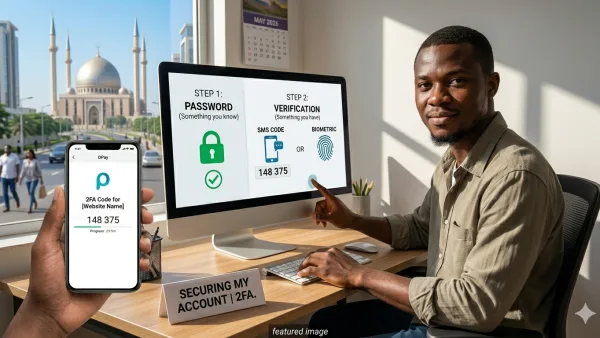
MFA fatigue attacks represent an AI-enhanced credential theft technique that targets the authentication step that was previously assumed to block credential-based attacks. In an MFA fatigue attack, an attacker who has obtained valid credentials bombards the victim with MFA push notifications — sometimes dozens within minutes — until the victim approves one simply to stop the notifications. The attacker is then authenticated. Countermeasure: use authenticator apps that require number matching (you must enter a specific number displayed on screen, not just tap approve) rather than simple push approval notifications, and be suspicious of any unexpected MFA prompt you did not initiate.
The Universal Detection Framework: How to Evaluate Any Suspicious Communication
Because modern phishing is no longer reliably identifiable by grammatical errors or suspicious visual design, the detection framework must shift from “does this look suspicious?” to “have I independently verified that this request is legitimate and appropriate?” This is a fundamentally different cognitive posture — one that treats any unsolicited request involving credentials, financial action, or sensitive information as unverified until confirmed through a separate channel.
The specific checks to apply to any suspicious communication, across all channels, are: verify the sender’s identity through a channel you control (not one provided in the suspicious communication); confirm the request makes sense in the context of your normal business processes; be especially alert to any combination of urgency, authority, and financial action — this combination characterises a disproportionate share of successful phishing attacks; check any URL before clicking by hovering (on desktop) or previewing (on mobile) to verify it leads to the expected domain; and when in doubt, do nothing until you have confirmed the legitimacy through independent verification.
The out-of-band verification principle deserves specific emphasis because it is the single most effective behavioural countermeasure against the widest range of phishing types. “Out of band” means using a communication channel separate from the one used to deliver the suspicious request. If the request arrived by email, verify by phone. If it arrived by phone, verify by email or in person. The verification contact information must come from a source you control — your phone’s address book, the company directory, the service provider’s official website — not from the suspicious communication itself. An attacker who has sent you a phishing email and included a fake phone number to call “for verification” has simply extended the phishing attack to a second channel.
Email-Specific Red Flags: The Checklist
Even though AI-generated phishing is harder to spot than older manual phishing, there are still structural and contextual signals that should trigger heightened scrutiny. These are not definitive proof of phishing — legitimate emails occasionally share some of these features — but their presence warrants careful verification before taking any action.
Check the actual sender email address, not just the display name. Email clients display the sender’s chosen display name (which can be anything) prominently while hiding the actual email address. “Microsoft Security” as a display name with an actual sending address of security-alert@outlook-verify-account.net is a phishing email. The display name is meaningless as an authentication signal; the actual sending domain is what matters. Check that the domain after the @ symbol is the genuine domain of the claimed sender, not a lookalike (micros0ft.com, paypa1.com, amazon-support.com).
Verify the link destination before clicking. On desktop browsers, hovering over a link shows the actual destination URL in the browser status bar. If the link text says “Click here to verify your account” but the destination URL is a string of random characters at an unfamiliar domain, the link is malicious. On mobile, press and hold a link to see the destination URL before deciding whether to open it. Be aware that attackers use URL shorteners and redirectors to obscure the final destination — a short link that shows a legitimate-looking intermediate URL may still deliver you to a phishing site.
Be suspicious of any attachment you were not expecting. Email attachments containing malware are a primary phishing delivery mechanism. HTML files, PDFs with embedded scripts, Office documents requesting macro enablement, and ZIP files containing executables are all used to deliver malware. If you receive an attachment you were not expecting, even from a known contact (whose account may have been compromised), verify with the sender by a separate channel before opening it.
Look for requests that are unusual relative to normal process. Legitimate services do not request password resets by email without you having initiated the process. Legitimate executives do not bypass normal approval processes for financial transactions. Legitimate IT departments do not request your password to troubleshoot your account. Legitimate government agencies do not demand immediate payment by gift card, cryptocurrency, or wire transfer. Any request that deviates from normal process should be verified through established channels before action is taken.
What to Do If You Think You’ve Been Phished
The median time to report a phishing email after clicking is 28 minutes — creating a 27.6-minute window between the initial credential compromise and the first attempt at containment. Speed matters: the faster you respond to a suspected phishing incident, the smaller the window for the attacker to exploit stolen credentials, conduct lateral movement, or initiate fraudulent transactions.
If you have clicked a suspicious link or entered credentials on a potentially fraudulent site: immediately change the password for any account you may have entered credentials for, and for any other account that uses the same password. Enable or check MFA on the compromised account. Report the incident to your IT team or IT provider immediately so they can review account access logs, identify any unauthorised sessions, and take further containment action. Do not wait to see if anything bad happens before reporting — by the time bad things are visibly happening, significant damage may already be done.
If you have authorised a financial transfer that may be fraudulent: contact your bank immediately to attempt a recall of the transfer. Many banks can recall wire transfers that have not yet been collected if notified quickly. File a report with the FBI’s Internet Crime Complaint Center (ic3.gov) in the US, or your national cybercrime reporting centre. Contact your cyber insurance provider. The earlier a potentially fraudulent transfer is reported, the higher the probability of recovery.
If you have opened a suspicious attachment: isolate the device from the network immediately (disable Wi-Fi, unplug network cable) to prevent malware from spreading to other systems. Contact IT or your IT provider and report what happened. Do not use the device further until it has been assessed. Do not assume that “nothing happened” simply because no immediate visible consequences are apparent — malware can establish persistent access silently, without creating obvious symptoms.
Building a Phishing-Resistant Organisation
Individual vigilance is essential but insufficient as the sole defence against phishing at organisational scale. The most phishing-resistant organisations in 2026 combine individual awareness with structural and technical measures that reduce the impact of the human errors that are inevitable when millions of phishing attacks are launched against any given organisation.
Phishing simulations — regularly sending employees realistic simulated phishing emails and measuring who clicks, who reports, and how quickly — are the most effective training mechanism available because they create direct experiential learning rather than passive information absorption. Employees who click in a simulation and receive immediate educational feedback retain the lesson far more effectively than those who attend an annual security awareness session. The simulations should include the full range of attack types — email, SMS, QR code, and voice scenarios — and should use AI-generated content to reflect the realistic quality of modern phishing rather than obviously suspicious examples.
Process controls for high-risk actions are the structural complement to individual training. A two-person approval requirement for wire transfers above a threshold amount, an out-of-band verbal confirmation requirement for vendor payment detail changes, and a callback verification requirement for any MFA reset request eliminate entire categories of BEC and vishing fraud regardless of whether any individual employee’s training is sufficient to recognise the attack. The most financially devastating phishing attacks succeed not because employees lack awareness but because the verification processes that would have caught them were absent or bypassable under pressure.
Phishing is the entry point for the majority of the most expensive cyberattacks in 2026. The good news is that it is also the most preventable category of attack — not through technology alone, but through the combination of trained human awareness, verified business processes, and the simple habit of pausing to confirm before acting on any request involving credentials, financial action, or sensitive information. The 21-second window between receiving a phishing message and clicking is the window in which every attack either succeeds or fails. Building the habit of using those 21 seconds to verify rather than comply is the most valuable cybersecurity investment any individual or organisation can make.


0 Comments
No comments yet. Be the first to share your thoughts!